
Turn Fedora into a pentest machine.
Pendora is a modular installation framework that transforms a standard Fedora Linux install into a penetration testing and security assessment VM — bringing Kali's toolset, workflows, and aesthetics to Fedora's modern Wayland, RPM/DNF, and systemd ecosystem.
$ git clone --branch master https://github.com/sec-moose/pendora && cd pendora && chmod +x install.sh upstreams/install-upstreams.sh && ./install.sh --all▊// architecture
Four tiers. Fully modular.
Tooling, services, and configuration are organized into dedicated tiers — package lists, installer scripts, and dotfiles you can read, edit, and extend.
Native DNF RPMs
pkg-lists/
131 packages verified against official Fedora repos — base compilers, networking, sniffers, web discovery, reversing, and forensics.
Pipx Isolated Tools
pipx-lists/
11 offensive Python utilities in isolated environments, safe from system library conflicts.
Upstreams & Containers
upstreams/
Vendor installers, git clones, and Docker containers for enterprise suites.
Shell & Look-and-Feel
zsh/
Interactive Zsh with autosuggestions, syntax highlighting, completions, and pentesting aliases.
// install
Keep GNOME, or go full tiling.
All three modes are tested and verified on Fedora Workstation VMs. Installing Sway never removes GNOME — pick your session at the GDM login screen.
Basic Pentest
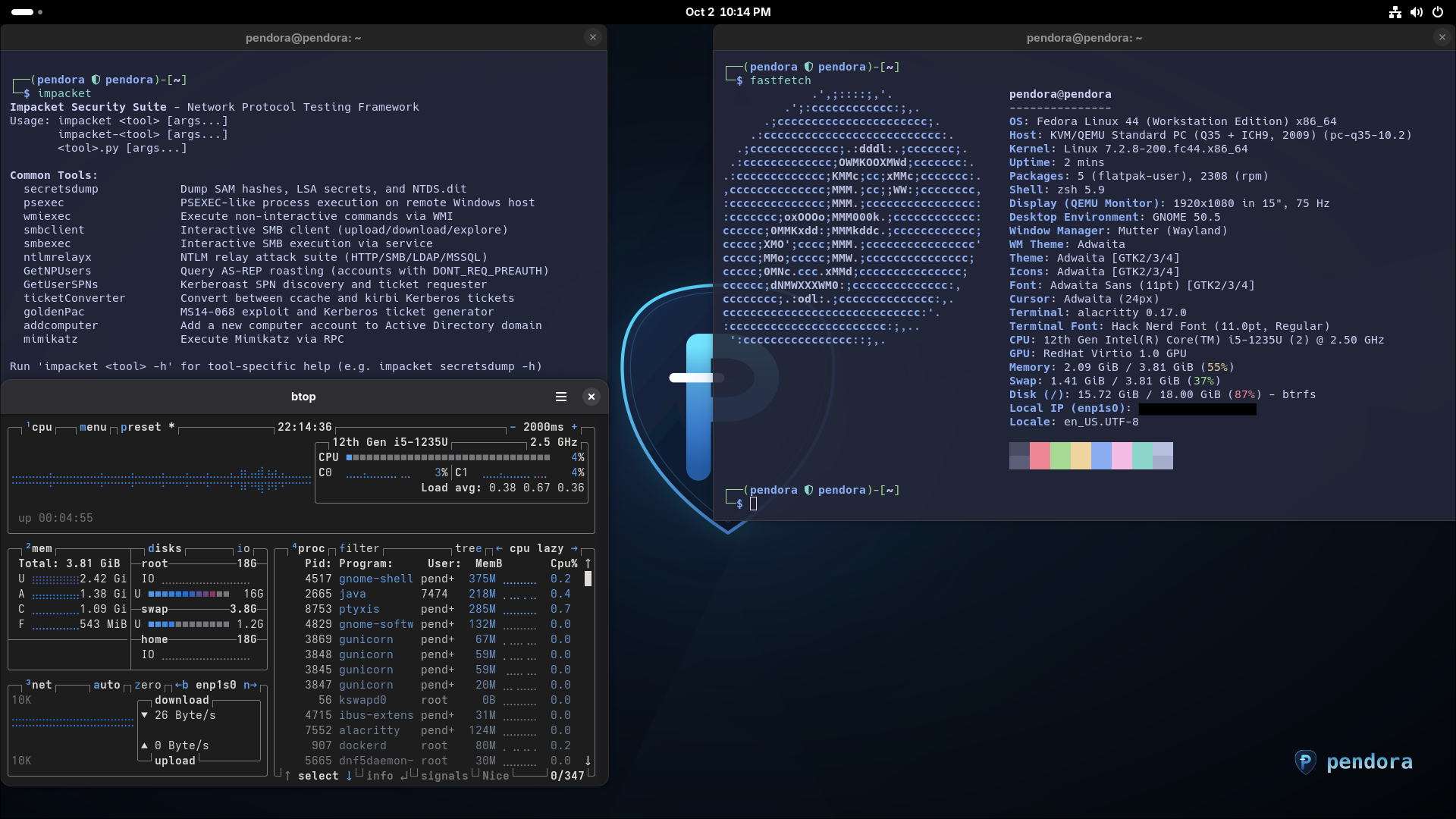
./install.sh --basic (-b)Keeps your default Fedora GNOME desktop intact while deploying all pentest CLI tools (00–60), Pipx tools, Docker container suites, Zsh, Neovim/LazyVim, Alacritty, hostname, and wallpapers. No desktop/window manager changes.
Sway Desktop
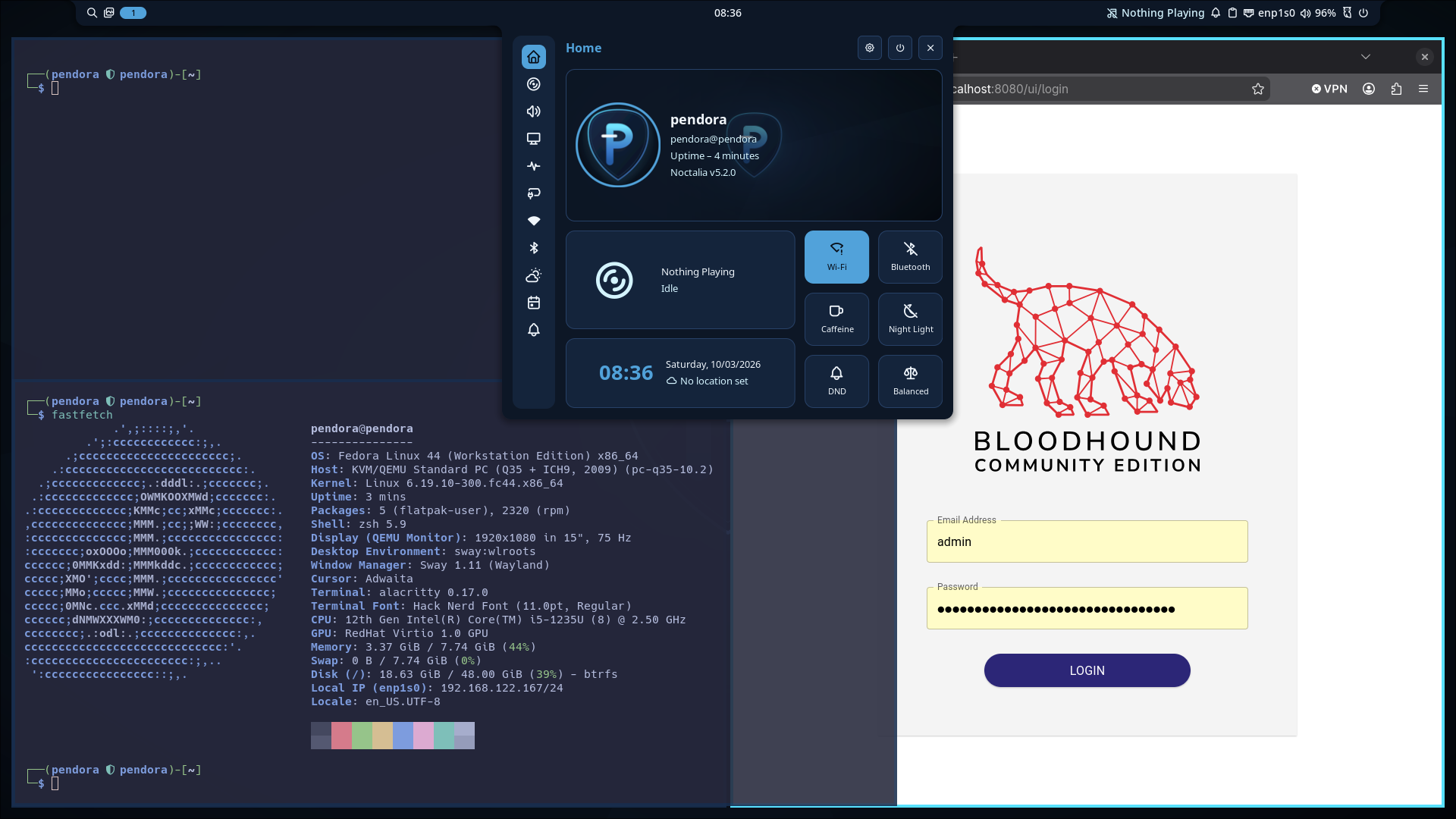
./install.sh --sway (-W)Standalone Sway desktop with the Noctalia shell, fixed 1080p rendering, GNOME keyboard layout inheritance, focus opacity, and bidirectional SPICE clipboard sharing. Includes base packages, Zsh, Neovim, Alacritty, and wallpapers — not the full pentest toolkit. Native Fedora Sway RPMs, no COPR; Hack Nerd Font comes from its official GitHub release.
Full Install
./install.sh --all (-a)Single-pass end-to-end deployment of everything in Basic plus the full Sway desktop stack (70-sway.list, dotfiles, screensharing portal services).
Start with an up-to-date Fedora Workstation VM, internet access, and a regular user with sudo permissions. Update with sudo dnf upgrade --refresh -y; reboot first if kernel or systemd packages changed. Never run sudo ./install.sh.
Inspect modules with ./install.sh --list and preview a full install with ./install.sh --all --dry-run. Full installation typically takes 15–30 minutes; watch for sudo prompts and credential cards. Large ZAP and Dev Tunnels downloads can look idle.
--yes automates installation and reboots on completion. Add --no-reboot to defer the reboot, then reboot manually to apply group and session changes. Use master or a release; the beta branch may receive script-breaking updates without notice.
// preview
Two desktops. One framework.
Keep Fedora's GNOME with --basic, or deploy the dynamic Sway tiling desktop with --sway — both tested and verified on QEMU/KVM.
$ --sway — Sway dynamic tiling desktop (Noctalia shell + Catppuccin Alacritty + focus opacity)
$ --basic — Fedora GNOME pentest desktop
// about
The full story, in plain text.
Pendora is a modular installation framework and configuration template that transforms a standard Fedora Linux installation into a penetration testing and security assessment virtual machine — bringing the toolset, workflows, and aesthetics of Kali Linux to Fedora's modern ecosystem (Wayland, RPM/DNF, systemd).
Everything is organized into four modular tiers:
- 01
Native DNF RPMs
(pkg-lists/)— 131 packages verified against official Fedora repos — base compilers, networking, sniffers, web discovery, reversing, and forensics. - 02
Pipx Isolated Tools
(pipx-lists/)— 11 offensive Python utilities in isolated environments, safe from system library conflicts. - 03
Upstreams & Containers
(upstreams/)— Vendor installers, git clones, and Docker containers for enterprise suites. - 04
Shell & Look-and-Feel
(zsh/)— Interactive Zsh with autosuggestions, syntax highlighting, completions, and pentesting aliases.
A single script, install.sh, deploys everything with three tested and verified modes: --basic (keeps GNOME, deploys all CLI tooling), --sway (adds the Sway tiling desktop with the Noctalia shell, Hack Nerd Font, and focus-based opacity — 100% native Sway RPMs, zero COPR; the font is downloaded upstream), and --all (everything in one pass). GNOME and Sway can be switched freely at the GDM login screen.
Containerized suites land ready on localhost: SysReptor reporting :8000, BloodHound CE :8080, and Portainer https://localhost:9443. Portainer auto-starts on boot; SysReptor and BloodHound are started on demand after reboot. BloodHound needs about 8 GB RAM. Target environment is a QEMU/KVM VM (baseline 4 vCPU / 4 GB / 25 GB; recommended 8 vCPU / 8 GB / 35–50 GB; ~11 GB install footprint, with 18–19 GB peak usage during installation).
Status: Beta — all three install modes verified on Fedora Workstation VMs, with continuous testing underway. Parts of the project were developed with AI assistance; some upstream modules execute vendor scripts directly — inspect all scripts before running, and use entirely at your own risk.
// dashboards
Containerized suites, ready on localhost.
Portainer CE
https://localhost:9443Complete the admin web setup within 5 minutes of first launch. Setup token: /opt/portainer/admin_setup.txt.
auto-starts after rebootSysReptor
http://localhost:8000User: reptor · Password: /opt/sysreptor/admin_credentials.txt
start on demand after rebootBloodHound CE
http://localhost:8080User: admin · Password: /opt/bloodhound/admin_credentials.txt · Needs about 8 GB RAM.
start on demand after rebootAfter reboot, start SysReptor and BloodHound through Portainer or run:
cd /opt/sysreptor/sysreptor/deploy && sudo docker compose up -d
cd /opt/bloodhound && sudo docker compose up -d
Reset the SysReptor password with cd /opt/sysreptor/sysreptor/deploy && sudo docker compose exec app python3 manage.py changepassword reptor. BloodHound exit code 137 indicates an out-of-memory failure.
Use entirely at your own risk
Pendora is provided "as is" without warranty of any kind. Some upstream modules fetch and execute vendor installation scripts directly — inspect all scripts before running them. Parts of this project were developed with AI assistance. Intended for authorized security testing and lab environments only.
// roadmap
Where it's headed.
Synced live from TODO.md in the repo — updates on GitHub show up here on their own, no republish needed.
## Bugfixes & Active Investigations
- [ ]
Sway VM Display Auto-Rescaling
- └Investigate dynamic display rescaling on window drag under QEMU/SPICE virtual machines (currently defaults to fixed
1080pinsway/.config/sway/config). Note: dynamic resizing was attempted (7a77b8c) and reverted to 1080p (a73643d) — document why before retrying; see README "Known Issues".
- └Investigate dynamic display rescaling on window drag under QEMU/SPICE virtual machines (currently defaults to fixed
- [ ]
SPICE Clipboard Bridge & User-Session De-duplication
- └Resolve the dual invocation of
sway-spice-clipboard-bridge(currently launched both via Sway'sexecautostart insway/.config/sway/configand viasystemd/user/sway-spice-clipboard-bridge.service). Standardize on a single lifecycle mechanism; a script-levelflocksingleton already makes duplicate instances exit immediately, so the current impact is a briefly spawned redundant process per session rather than SPICE socket contention.
- └Resolve the dual invocation of
## Testing & Quality Assurance
- [ ]
Thorough Testing of Included Tools and Configurations
- └Comprehensive testing of native Fedora RPM binaries in
$PATH(e.g.nmap,tcpdump,wireshark,ffuf,hydra,john). - └Functional validation of all 11 pipx offensive utilities (
netexec,impacket-*symlinks,/usr/local/bin/impacketlauncher,certipy-ad,bloodhound-ce,sqlmap). - └Operational testing of standalone upstream CLI wrappers and wordlists (
rustscan,naabu,devtunnel,responder,msfconsole,/usr/share/wordlists/seclists). - └Validation of Sway desktop configuration, window manager hotkeys (
$mod+t,$mod+Shift+Arrows), Noctalia bar widgets, SPICE host/guest clipboard bridge, and Neovim LazyVim plugin bootstrap.
- └Comprehensive testing of native Fedora RPM binaries in
- [ ]
Automated Post-Install Verification Harness (`./install.sh --test` / `--verify`)
- └Implement an automated health-check suite and CLI subcommand that verifies all RPM binaries, smoke-tests all 11 pipx offensive tools, validates
/usr/local/binwrappers, and checks HTTP health across the three local container ports (127.0.0.1:9443,8000,8080).
- └Implement an automated health-check suite and CLI subcommand that verifies all RPM binaries, smoke-tests all 11 pipx offensive tools, validates
## Tooling & Upstream Additions
- [ ]
ADWS Domain Dump (r4cken fork)
- └Active Directory Web Services dump utility (
pipx, samegit+httpspattern as NetExec inpipx-lists/pipx-tools.list). - └Source: github.com/r4cken/adwsdomaindump
- └Active Directory Web Services dump utility (
- [ ]
Nuclei
- └Fast, template-based vulnerability scanner by ProjectDiscovery.
- └Install as a standalone upstream binary in
upstreams/install-upstreams.sh(same channel as naabu/rustscan). - └Source: github.com/projectdiscovery/nuclei
- [ ]
Coercer
- └Automatic Active Directory machine account authentication coercion utility (
pipx— PyPI packagecoercer). - └Source: github.com/p0dalirius/coercer
- └Automatic Active Directory machine account authentication coercion utility (
- [ ]
Language Toolchain Gaps
- └Add Go toolchain (
golang) topkg-lists/00-base.list("Runtimes, Compilers & Build Tools"); decide whether Java / Node.js are in scope for offensive tooling before adding.
- └Add Go toolchain (
- [ ]
Oh My Pi (omp)
- └Terminal AI coding agent with IDE tooling and shell integration.
- └Install via installer-script style in
upstreams/install-upstreams.sh(precedent: SysReptor remote installer, devtunnel binary). - └Source: github.com/can1357/oh-my-pi (
https://omp.sh/install)
## Desktop Environment & UX Polish
- [ ]
Rofi Theme Customization
- └Add native Catppuccin Macchiato / Pendora colorway for Rofi launcher (
$mod+Shift+space).
- └Add native Catppuccin Macchiato / Pendora colorway for Rofi launcher (
- [ ]
Noctalia Widgets & Bar Polish
- └Configure custom status bar items (VPN tunnel status
tun0/wg0, IP address widget, system resource monitors).
- └Configure custom status bar items (VPN tunnel status
## Framework & Installer Improvements
- [ ]
Container Restart-Policy Decision (SysReptor / BloodHound)
- └Both stacks intentionally do not auto-start after reboot. Decide: keep manual start (document it in README + TOOL_REFERENCE) or pin
restart: unless-stoppedin the generated compose files so behavior matches Portainer's documentedrestart: always.
- └Both stacks intentionally do not auto-start after reboot. Decide: keep manual start (document it in README + TOOL_REFERENCE) or pin
- [x]
SysReptor / BloodHound Start-on-Demand Documentation
- └Re-running
./install-upstreams.sh sysreptorstarts a stopped stack automatically;assets/TOOL_REFERENCE.md(dashboard table + "Manage all containers via Docker") now documents the post-reboot start commands (docker compose up -d) alongside the log commands.
- └Re-running
- [ ]
Cryptographic Checksum Verification (SHA-256) for Standalone Downloads
- └Pin known SHA-256 release hashes (or fetch official
.sha256sums) for GitHub release binaries (rustscan,naabu,Hack Nerd Font), Microsoft Dev Tunnels, and SysReptor installer before deploying to/usr/local/binor executing undersudo.
- └Pin known SHA-256 release hashes (or fetch official
- [ ]
Modular Uninstall / Cleanup
- └Add
./install.sh --cleanor module removal option to safely un-stow configurations and purge unused cache files.
- └Add
- [ ]
Air-Gapped / Offline Deployment
- └Support pre-cached RPMs and container tarballs for offline lab deployment.
$ pendora roadmap --todo | 15 open tasks · synced from TODO.md · 2026-10-14▊
// faq
Questions, answered.
The things people ask before running an unknown install script on a fresh VM.
?What exactly is Pendora?
A modular installation framework and configuration template that turns a standard Fedora Linux install into a full penetration testing and security assessment VM — Kali's toolset and workflows, running natively on Fedora's RPM/DNF, Wayland, and systemd ecosystem.
?Why was Pendora developed?
Honestly? I wanted a familiar environment. Kali is great, but I enjoy Fedora far more — and since my host runs Fedora with Hyprland, I wanted that same feeling in my pentest VM. Manually reinstalling every package after a fresh setup, with no snapshots or backups to fall back on, was exactly the problem Pendora solves. I also wanted to give something back to the open-source community — and somewhere around that point, the idea of Pendora was born.
?Who is Pendora made for?
Penetration testers and red teamers who want a complete assessment VM through a repeatable install; students and CTF players learning on professional tooling in an isolated QEMU/KVM sandbox; Fedora users who want Kali's toolset without leaving DNF, Wayland, and systemd behind; and homelab or blue-team folks who need the networking packages plus SysReptor and BloodHound CE on localhost.
?Do I need to wipe my Fedora install or dual-boot?
No. Pendora runs as a single script, ./install.sh, on top of an existing Fedora installation. Everything is organized into plain-text lists you can read and edit before running anything. It's built and tested for a QEMU/KVM VM — snapshot your VM and you can always roll back.
?Will installing Sway remove my GNOME desktop?
Never. Installing Sway adds a second session — GNOME stays exactly where it is. Switch between the two at the GDM login screen, any time.
?Which install mode should I pick?
--basic if you want to keep your GNOME desktop and just get the tooling (recommended). --sway for a standalone Sway/Noctalia desktop with base packages and shell/editor configuration — it does not install the complete pentest toolkit. --all combines Basic and Sway in a single pass.
?What are the system requirements?
Baseline: 4 vCPU, 4 GB RAM, 25 GB disk. Recommended: 8 vCPU, 8 GB RAM, 35–50 GB. The install footprint is roughly 11 GB, with 18–19 GB peak usage during installation. Use up-to-date Fedora Workstation in a virt-manager/QEMU/KVM VM with internet access. BloodHound CE needs about 8 GB RAM.
?What do I get running out of the box?
131 native Fedora RPMs, 11 Pipx-isolated Python tools (netexec, impacket, certipy-ad, bloodhound-ce, updog, sqlmap…), standalone upstream suites including Responder, and containers — SysReptor on http://localhost:8000, BloodHound CE on http://localhost:8080, Portainer CE on https://localhost:9443 — plus Kali-style Zsh, Alacritty, and Neovim/LazyVim. SysReptor and BloodHound need starting after reboot; Portainer auto-starts.
?Can I add my own tools?
Yes — that's the point. Edit package lists in pkg-lists/ and pipx-lists/, installers in upstreams/, and shell dotfiles in zsh/. Comment out a package line to skip it; deleting it from a list does not uninstall an existing tool. Use -c to select categories, --file for a custom list, --pipx for Python tools, or --docker for the engine and container suites. Edit them directly, or use the suggest-tool form on the tools page to open a pre-filled GitHub issue.
?Does Sway resize when I resize the VM viewer?
Not yet. Sway uses a configured 1080p desktop; dynamic SPICE viewer resizing remains under investigation. Use GNOME at the GDM login screen if you need automatic display resizing. Bidirectional host/guest clipboard sharing in Sway is resolved and verified; removing a redundant bridge launch is still planned.
?How should I prepare, and how long does installation take?
Snapshot and update your Fedora VM first with sudo dnf upgrade --refresh -y. Run as your regular user, never sudo ./install.sh. Review ./install.sh --list and ./install.sh --all --dry-run before installing. A full install typically takes 15–30 minutes, with sudo prompts and credential cards; large downloads can appear idle. --yes automates the run and reboots afterward unless --no-reboot is added.
?Are the new roadmap tools available yet?
Not yet: ADWS Domain Dump, Nuclei, Coercer, and Oh My Pi are planned additions. The automated --test / --verify harness, uninstall/cleanup, and offline deployment are also still planned. The roadmap checkboxes distinguish open tasks from completed work.
?Is it production-ready?
The project is in beta: all three install modes are verified on Fedora Workstation VMs, while wider tool and container testing continues. Use master or a published release; the beta branch is unstable and can receive script-breaking changes without notice. Parts of the project were developed with AI assistance, and some upstream modules execute vendor scripts directly — inspect everything before running, and use entirely at your own risk.
$ pendora faq --list | 13 entries · more in the README▊